💡 DIY Computer Fixes?

Grab my easy step-by-step guide and keep your computer running like new.

Grab My Guide →

7 Life-Changing Dyslexia-Friendly Windows Tips for Windows 10 and 11

Many of my customers live with dyslexia, and they’ve told me something I never forget: words on a screen can feel steady one moment and scattered the next.

Windows 10 and Windows 11 include several built-in tools that can help bring calm and clarity to the screen. In this guide, I’ll share my best dyslexia-friendly Windows tips to make reading easier, reduce frustration, and help your computer feel more supportive.

Dyslexia-Friendly Windows Tips

I want to show you seven Dyslexia-Friendly Windows Tips that can genuinely make everyday computer tasks feel lighter and less demanding.

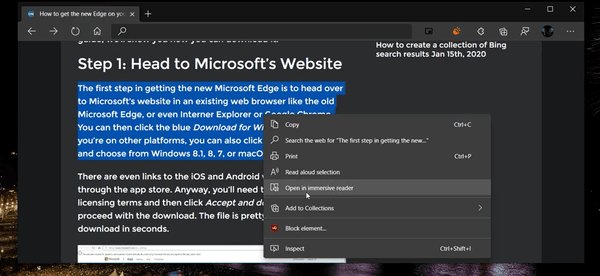
1. Use Immersive Reader for a calmer, cleaner page that’s easier to track

Microsoft Edge includes a built-in feature called Immersive Reader. It clears away ads, sidebars, and distractions so the text sits quietly in the center of the screen.

Here’s how to turn it on:

  • Open the webpage you want to read
  • Click the book icon in the address bar

The page instantly transforms into a clean reading layout

Inside Immersive Reader, you can adjust the spacing, font style, column width, and even use Read Aloud.

This is one of my favorite dyslexia-friendly Windows tips, because many people tell me it feels like someone opened a window and let all the visual noise drift out.
Immersive Reader

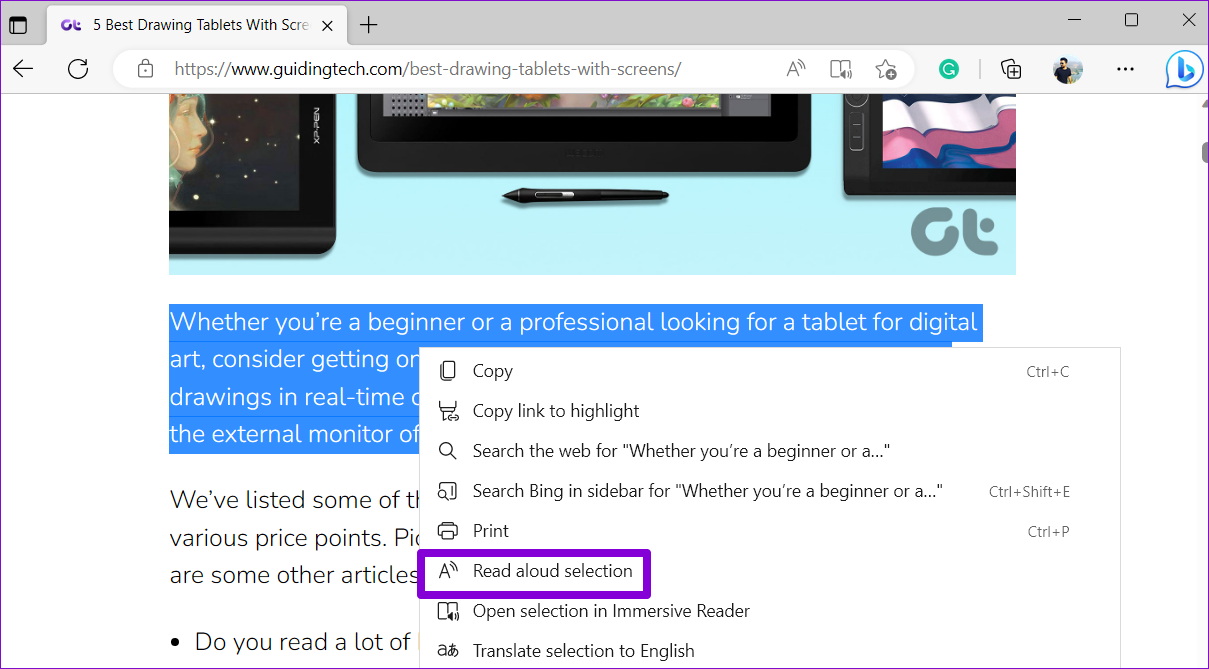
2. Use Read Aloud to give your eyes a break

When words start to blur or feel jumpy, Windows has a built-in friend called Read Aloud. It reads the screen to you in a steady, natural voice so your eyes don’t have to carry all the weight.

Here’s how to turn it on:

  • In Microsoft Edge: Press Ctrl + Shift + U
  • In many Windows apps: Look for a Read Aloud button in the toolbar
  • Adjust the speed and voice until it feels calm and comfortable

Many people with dyslexia tell me that listening while reading helps everything “click” more easily. It improves comprehension and turns the whole experience into something more relaxing and steady.
Read Aloud

3. Increase overall system text size

You shouldn’t have to squint or lean in like you’re studying ancient markings. Windows gives you a simple way to make all text bigger at once, so everything feels easier to read.

Here’s how to change it:

  • Open Settings
  • Choose Accessibility
  • Select Text size
  • Slide the bar until the text feels comfortable for your eyes

This one adjustment can make your entire computer feel friendlier and far less tiring to use. It’s one of the quickest dyslexia-friendly Windows tips you can try.

4. Use enhanced text spacing for easier tracking

A little extra breathing room between letters and lines can make a big difference. When text feels crowded, it becomes harder to follow. When spacing opens up, reading feels calmer and more controlled.

Here’s how to turn on enhanced spacing in Immersive Reader:

  • Open Text preferences
  • Turn on Text spacing

The change is subtle but surprisingly powerful. It’s like giving every word a bit of elbow room so your eyes can glide through the page instead of wrestling with it.

5. Switch to readability-first fonts

Some fonts are simply calmer to look at. Clean shapes, generous spacing, and steady lines can make reading feel more grounded and less tiring.

Here are a few reliable choices you can switch to in Immersive Reader, Word, or many other apps:

Calibri

Verdana

Tahoma

Arial

These fonts stay stable on the screen and help letters hold their shape instead of wandering or doubling back.

Try a dyslexia-optimized font

Windows 11 doesn’t include OpenDyslexic, but you can install it in seconds — and many of my customers say it makes reading noticeably easier.

Download OpenDyslexic:
https://opendyslexic.org

Once it’s installed, here’s where to find it:

  • Open Settings
  • Go to Personalization
  • Select Fonts
  • Then choose it inside the apps you use most, such as Microsoft Edge, Word, Office, Adobe Reader, or Kindle.

It’s a small change that can make reading feel steadier and far more comfortable.

6. Experiment with Color Filters

A gentle tint or subtle color shift can make text feel more grounded and easier to follow. Windows has built-in Color Filters that can soften visual stress, and many people with dyslexia find them surprisingly soothing.

Here’s how to try them:

  • Go to Settings
  • Open Accessibility
  • Select Color filters
  • Test a few options until you find one that feels comfortable

Some people prefer a warmer tint. Others like a cooler shade or a slightly muted contrast. Take a minute to explore — you might discover a filter that makes your screen feel like it finally exhaled.

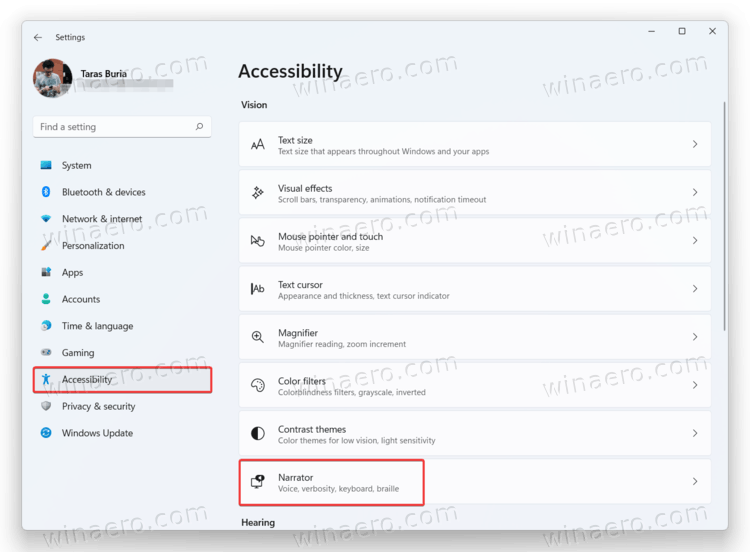
7. Use Narrator when you need full reading support

Windows includes a built-in screen reader called Narrator, and it’s one of those features people often overlook until they truly need it. Narrator is steady, patient, and surprisingly capable when reading becomes overwhelming.

With Narrator, you can:

Have text read aloud on almost any screen

Navigate apps using your keyboard

Get help following paragraphs when your eyes need a break

To turn it on:

  • Go to Settings
  • Open Accessibility
  • Select Narrator

Think of it as a safety net that’s always there, ready to support you whenever the screen starts to feel a little too demanding.
Narrator

Your computer should never be a source of exhaustion. Windows 10 and Windows 11 include powerful tools that can make reading easier and less stressful for people with dyslexia — and the best part is that they’re already built in.

If you ever want help turning these features on or adjusting them to fit your needs, I’m always here to guide you step-by-step. You deserve a computer that works with you, not against you. And if anything ever feels confusing or overwhelming, you can reach out anytime and I’ll walk you through it at your pace.

If you or someone you care about struggles with dyslexia, you don’t have to wrestle with your computer on your own. I help people every day adjust their Windows settings so reading feels calmer, clearer, and far less stressful.

If you’d like help setting up any of these tools — or you’re feeling buried under menus and options — I’m here for you.

You can book a session with me anytime at https://thattechjeff.com. And remember, there’s no charge if I can’t help.

Your screen should meet you exactly where you are, not the other way around.

All reviews
Google
Google
Facebook
Facebook
Yelp
Yelp
Trustindex
Trustindex
Bark
Bark
Thumbtack
Thumbtack
Trustindex star 1Trustindex star 2Trustindex star 3Trustindex star 4Trustindex star 55.0
5.0Trustindex star 1Trustindex star 2Trustindex star 3Trustindex star 4Trustindex star 5
Top Rated Service
Verified by Trustindex
Trustindex verified badge is the Universal Symbol of Trust. Only the greatest companies can get the verified badge who has a review score above 4.5, based on customer reviews over the past 12 months. Read more
Google star 1Google star 2Google star 3Google star 4Google star 55.0
5.0Google star 1Google star 2Google star 3Google star 4Google star 5
Top Rated Service
Verified by Trustindex
Trustindex verified badge is the Universal Symbol of Trust. Only the greatest companies can get the verified badge who has a review score above 4.5, based on customer reviews over the past 12 months. Read more
Facebook star 1Facebook star 2Facebook star 3Facebook star 4Facebook star 55.0
5.0Facebook star 1Facebook star 2Facebook star 3Facebook star 4Facebook star 5
Top Rated Service
Verified by Trustindex
Trustindex verified badge is the Universal Symbol of Trust. Only the greatest companies can get the verified badge who has a review score above 4.5, based on customer reviews over the past 12 months. Read more
Yelp star 1Yelp star 2Yelp star 3Yelp star 4Yelp star 55.0
5.0Yelp star 1Yelp star 2Yelp star 3Yelp star 4Yelp star 5
Top Rated Service
Verified by Trustindex
Trustindex verified badge is the Universal Symbol of Trust. Only the greatest companies can get the verified badge who has a review score above 4.5, based on customer reviews over the past 12 months. Read more
Trustindex star 1Trustindex star 2Trustindex star 3Trustindex star 4Trustindex star 55.0
5.0Trustindex star 1Trustindex star 2Trustindex star 3Trustindex star 4Trustindex star 5
Top Rated Service
Verified by Trustindex
Trustindex verified badge is the Universal Symbol of Trust. Only the greatest companies can get the verified badge who has a review score above 4.5, based on customer reviews over the past 12 months. Read more
Bark star 1Bark star 2Bark star 3Bark star 4Bark star 55.0
5.0Bark star 1Bark star 2Bark star 3Bark star 4Bark star 5
Top Rated Service
Verified by Trustindex
Trustindex verified badge is the Universal Symbol of Trust. Only the greatest companies can get the verified badge who has a review score above 4.5, based on customer reviews over the past 12 months. Read more
Thumbtack star 1Thumbtack star 2Thumbtack star 3Thumbtack star 4Thumbtack star 55.0
5.0Thumbtack star 1Thumbtack star 2Thumbtack star 3Thumbtack star 4Thumbtack star 5
Top Rated Service
Verified by Trustindex
Trustindex verified badge is the Universal Symbol of Trust. Only the greatest companies can get the verified badge who has a review score above 4.5, based on customer reviews over the past 12 months. Read more
Posted on Google Google
The Biggerstaff's profile picture
The Biggerstaff's
4 days ago
Google star 1Google star 2Google star 3Google star 4Google star 5Trustindex verifies that the original source of the review is Google.
We highly recommend Jeff. He is so patient, knowledgeable and trustworthy. We've never presented Jeff with an issue that he couldn't resolve. So thankful we found him!
Posted on Google Google
Kevin Su Fukagawa profile picture
Kevin Su Fukagawa
5 days ago
Google star 1Google star 2Google star 3Google star 4Google star 5Trustindex verifies that the original source of the review is Google.
Jeff did an amazing job at optimizing the computers ! He is super kind, patient, and knowledgeable. He fixed everything and more. His prices are super reasonable and I will definitely ask him for help in the future for any computer issues that may arise. Thank you Jeff!!
Posted on Google Google
Dennis Young profile picture
Dennis Young
7 days ago
Google star 1Google star 2Google star 3Google star 4Google star 5Trustindex verifies that the original source of the review is Google.
Jeff offers a great service to many of us who depend on technology, but can't easily solve the technical problems when they arise. His sincerity in wanting to help you comes across very strong. Jeff talks through what he is doing so you can understand the steps he is taking which I found very valuable. I felt like I was in class listening to the teacher and taking notes. I also found that he is a bulldog and won't give up until he solves it. Jeff never tried to upsell me, but instead, when he discovered other technical issues that should be addressed, he just went ahead and corrected them. I respect someone who truly delivers on his promises. I am normally nervous dealing with someone over the internet, but I am glad I found Jeff and I can say I trust him.
Posted on Google Google
Robert Lee profile picture
Robert Lee
8 days ago
Google star 1Google star 2Google star 3Google star 4Google star 5Trustindex verifies that the original source of the review is Google.
Wife's laptop stopped receiving emails. I contacted Jeff and in a matter of a few minutes he resolved the issue . Thanks Jeff, Great work. I recommend him to anyone that needs help.
Posted on Facebook Facebook
Robert Lee profile picture
Robert Lee
8 days ago
positiverecommendsTrustindex verifies that the original source of the review is Facebook.
Fast and easy to work with.
Posted on Google Google
Jennifer Grey profile picture
Jennifer Grey
11 days ago
Google star 1Google star 2Google star 3Google star 4Google star 5Trustindex verifies that the original source of the review is Google.
We highly recommend Jeff! Patient, kind and very knowledgeable. We will definitely use him again!
Posted on Google Google
Dorothy Niccolls profile picture
Dorothy Niccolls
18 days ago
Google star 1Google star 2Google star 3Google star 4Google star 5Trustindex verifies that the original source of the review is Google.
Jeff was very informative and helpful as he worked with me on transferring data, saving information and changing to a new computer! I highly recommend his services.
Posted on Facebook Facebook
Cassandra Thompson profile picture
Cassandra Thompson
19 days ago
positiverecommendsTrustindex verifies that the original source of the review is Facebook.
If I could give Jefff 8 stars I would . He goes way beyond what he needs to, really cares about helping you, is quick, explains in basic terms, patient and just gives me the assurance hat I hav found my "go to guy" with any computer issue.
Posted on Google Google
Varni Learned profile picture
Varni Learned
23 days ago
Google star 1Google star 2Google star 3Google star 4Google star 5Trustindex verifies that the original source of the review is Google.
Jeff took care of updating my old laptop. He is knowledgeable, patient and kind! He also took all my pics off phone and put on hard drive for me to make lots of space for my travels. He also walked me through all I need to do for future. He knows exactly what to do for your computer! Trust him!
Posted on Google Google
Nancy Ogle profile picture
Nancy Ogle
25 days ago
Google star 1Google star 2Google star 3Google star 4Google star 5Trustindex verifies that the original source of the review is Google.
Jeff is knowledgable, patient, and a super nice person. Highly recommend!
Posted on Google Google
Peter Reynolds profile picture
Peter Reynolds
26 days ago
Google star 1Google star 2Google star 3Google star 4Google star 5Trustindex verifies that the original source of the review is Google.
Jeff is amazing. He's very, very knowledgeable and has helped me resolve a number of problems. He's also a very pleasant guy to work with. I can't adequately express how much help he's been. Whenever I have a tech issue he's the one I call! I consider myself very lucky to have his assistance!
Posted on Google Google
Earleen Thomas profile picture
Earleen Thomas
39 days ago
Google star 1Google star 2Google star 3Google star 4Google star 5Trustindex verifies that the original source of the review is Google.
I've enjoyed Jeff's expertise and helpfulness for years. He's efficient, offering clear instructions and SO helpful! I've referred him to others who had also enjoyed his services. I HIGHLY recommend him!
Posted on Trustindex Trustindex
RAYMOND PEARSON profile picture
RAYMOND PEARSON
61 days ago
Trustindex star 1Trustindex star 2Trustindex star 3Trustindex star 4Trustindex star 5Trustindex verifies that the original source of the review is Trustindex.
EXCELLENT SERVICE!! Jeff provided excellent service! He is knowledgeable, responsive, and provides outstanding customer support throughout the entire process. He quickly resolved my networking and computer issues, explained everything clearly, and made the experience stress-free. I highly recommend his services to anyone needing reliable IT and networking assistance. J Raymond Pearson ,Jr, CPA
Posted on Facebook Facebook
William Hietanen profile picture
William Hietanen
61 days ago
positiverecommendsTrustindex verifies that the original source of the review is Facebook.
Had those "other guys" from that big box store for years until I stumbled on Jeff. This guy is UNBELIEVABLE! Personable, Professional, He's got my business forever and a day!!
Posted on Trustindex Trustindex
Cheryl Henderson profile picture
Cheryl Henderson
66 days ago
Trustindex star 1Trustindex star 2Trustindex star 3Trustindex star 4Trustindex star 5Trustindex verifies that the original source of the review is Trustindex.
You cannot find a better tech professional Jeff, after much persistence, resolved a Microsoft OneDrive issue that had been troubling us for some time. His expertise, reliability, and fair pricing never fail to impress. We've trusted him for years and remain consistently grateful for his outstanding service. Highly recommended!
Posted on Facebook Facebook
Cheryl Henderson profile picture
Cheryl Henderson
66 days ago
positiverecommendsTrustindex verifies that the original source of the review is Facebook.
Another amazing job by Jeff. He won't quit until he resolves the problem. He's trustworthy and his prices are fair.
Posted on Yelp Yelp
Cheryl H. profile picture
Cheryl H.
67 days ago
Yelp star 1Yelp star 2Yelp star 3Yelp star 4Yelp star 5Verified
Jeff just resolved a longstanding Microsoft One-Drive issue. This project was just another amazing job by Jeff. I am so grateful for Tech Jeff. He's competent, trustworthy and his prices are more than fair. Jeff has been our Tech person for a long time.
Posted on Facebook Facebook
Candace Lienhart profile picture
Candace Lienhart
71 days ago
positiverecommendsTrustindex verifies that the original source of the review is Facebook.
Jeff is just the tech angel you always wanted. Polite, kind, ethical, thorough, expert at his craft....and then he is also reasonably priced for his priceless service! And you can book an appointment online! thattechjeff.com put him in your contacts list.....
Posted on Facebook Facebook
Ryans-Falls René profile picture
Ryans-Falls René
72 days ago
positiverecommendsTrustindex verifies that the original source of the review is Facebook.
Very efficient and reasonable pricing. Fixes my computer virtually and I've never had an issue. Very cool guy
Posted on Facebook Facebook
Battle Ground Art Alliance - Public Page profile picture
Battle Ground Art Alliance - Public Page
73 days ago
positiverecommendsTrustindex verifies that the original source of the review is Facebook.
This guy is amazing...been using Jeff for years and would not consider using anyone else. He has high standards, reasonable charges, and is extremely knowledgable. Can't recommend him enough!
Posted on Facebook Facebook
William P Cox Jr profile picture
William P Cox Jr
75 days ago
positiverecommendsTrustindex verifies that the original source of the review is Facebook.
Jeff is great! A tremendous computer resource to to have literally at your fingertips! Very efficient, and very affordable!
Posted on Facebook Facebook
Lee Davidson profile picture
Lee Davidson
84 days ago
positiverecommendsTrustindex verifies that the original source of the review is Facebook.
Jeff does an excellent job. He is very knowledgeable and friendly. I will continue using him in the future.🙂
Posted on Facebook Facebook
Genuine Essiac profile picture
Genuine Essiac
104 days ago
positiverecommendsTrustindex verifies that the original source of the review is Facebook.
That Tech Jeff can help with any computer problem we have encountered. No problem is too big or too small. It's incredible having a reliable resource like him with fast service, plus he only charges if he fixes it!
Posted on Thumbtack Thumbtack
Christopher S. profile picture
Christopher S.
279 days ago
Thumbtack star 1Thumbtack star 2Thumbtack star 3Thumbtack star 4Thumbtack star 5Verified
Noice
Posted on Trustindex Trustindex
TEX SUN profile picture
TEX SUN
283 days ago
Trustindex star 1Trustindex star 2Trustindex star 3Trustindex star 4Trustindex star 5Trustindex verifies that the original source of the review is Trustindex.
Jeff the tech guy is offers exceptional computer service! Jeff is incredibly experienced and honest! He helped me clean up my computer, found 27 infections that Norton missed, and got me more space for my Microsoft account. His prices are more than fair, and he doesn't take advantage of customers. I would highly recommend Jeff to anyone in need of online computer tech support. Exceptional service!
Posted on Thumbtack Thumbtack
John R. profile picture
John R.
306 days ago
Thumbtack star 1Thumbtack star 2Thumbtack star 3Thumbtack star 4Thumbtack star 5Verified
Jeff helped me with my computer issue. I would recommend him to anyone with computer issues.
Posted on Thumbtack Thumbtack
Rose W. profile picture
Rose W.
432 days ago
Thumbtack star 1Thumbtack star 2Thumbtack star 3Thumbtack star 4Thumbtack star 5Verified
Jeff was a godsend. I thought I was going to lose my mind when our computer developed problems. And problems there were! Jeff stayed on for as long as it took - believe me, it was a long for him It didn't matter what roadblock he hit fixing one aspect of the computer problems, he just approached each situation from a different angle. He has our computer running better than it ran brand new.
Posted on Thumbtack Thumbtack
Amos B. profile picture
Amos B.
554 days ago
Thumbtack star 1Thumbtack star 2Thumbtack star 3Thumbtack star 4Thumbtack star 5Verified
Jeff is the absolute best. We have come to rely on Jeff for all of computer and technology needs. He is reliable, responsive and reasonable. I highly recommend Jeff for any needed computer services no matter where you might be located.
Posted on Trustindex Trustindex
Ken Dellefield profile picture
Ken Dellefield
567 days ago
Trustindex star 1Trustindex star 2Trustindex star 3Trustindex star 4Trustindex star 5Trustindex verifies that the original source of the review is Trustindex.
You won't be disappointed in using Jeff at Thattechjeff.com I have been getting help from Jeff at That Tech Jeff for over five years, and I can promise you that you will not be disappointed with his ability to identify the problem and quickly find the solution. He responds quickly to requests (often the same day), and after giving him permission, he takes over your computer (you can watch what he is doing), or he will get back to you with what fixes he has made. He has helped me organize my folders, sort out what apps I need and don't need, find out why my computer is slow and fix it, etc. He also helped me in how to choose a new computer to better meet my needs. He is completely honest, efficient, and effective. He always explains the problem and how he fixed it (He is a great teacher). Finally, he is unbelievably inexpensive (I do not know how he keeps his prices low) and offers discounts/specials for returning customers.
Posted on Trustindex Trustindex
Lloyd Nattkemper profile picture
Lloyd Nattkemper
590 days ago
Trustindex star 1Trustindex star 2Trustindex star 3Trustindex star 4Trustindex star 5Trustindex verifies that the original source of the review is Trustindex.
Jeff has been absolutely superb in helping me resolve issues on desktop and laptop computers, including elimination of downloads I no longer needed cluttering my computer, resolving security concerns, explaining how to keep things ordered and cleaned-up, and getting complicated matters straightened and working smoothly. He is patient, professional, clearly knows IT inside and out, and is available when I need assistance. He is the best!!
Posted on Trustindex Trustindex
Christine Borcher profile picture
Christine Borcher
590 days ago
Trustindex star 1Trustindex star 2Trustindex star 3Trustindex star 4Trustindex star 5Trustindex verifies that the original source of the review is Trustindex.
Jeff is great, he got my computer running and is always available to help. He is very patient and explains things in language I can understand.
Posted on Trustindex Trustindex
Darryl Anderson profile picture
Darryl Anderson
601 days ago
Trustindex star 1Trustindex star 2Trustindex star 3Trustindex star 4Trustindex star 5Trustindex verifies that the original source of the review is Trustindex.
I just had the most pleasurable encounter with an online service person. Jeff was knowledgeable and gratuitous. I am confident that I will have no fear should I have computer problems in the future because I know who to contact if necessary.
Posted on Trustindex Trustindex
Cheryl Henderson profile picture
Cheryl Henderson
601 days ago
Trustindex star 1Trustindex star 2Trustindex star 3Trustindex star 4Trustindex star 5Trustindex verifies that the original source of the review is Trustindex.
Exceptional service! Jeff cares and gets results
Posted on Trustindex Trustindex
Debra Cree profile picture
Debra Cree
602 days ago
Trustindex star 1Trustindex star 2Trustindex star 3Trustindex star 4Trustindex star 5Trustindex verifies that the original source of the review is Trustindex.
Jeff was great. He spent much more time than I expected to try to resolve my problems. He kept in touch with me the entire time. I highly recommend Jeff for integrity, knowledge, and competence.
Posted on Trustindex Trustindex
Julia Day profile picture
Julia Day
602 days ago
Trustindex star 1Trustindex star 2Trustindex star 3Trustindex star 4Trustindex star 5Trustindex verifies that the original source of the review is Trustindex.
Issues with trying to get into laptop with no password. Jeff was able to get it fixed and now I have a working laptop!! His expertise, support and availability far exceeded my expectations. You can’t go wrong working with him.
Posted on Thumbtack Thumbtack
Clint G. profile picture
Clint G.
612 days ago
Thumbtack star 1Thumbtack star 2Thumbtack star 3Thumbtack star 4Thumbtack star 5Verified
Just from my description of the problem I was having Jeff immediately had a strong belief of what the cause of the problem which proved to be correct and he quickly resolved the problem. I wish I had gone to him from the start rather than wasting many hours over several days with Microsoft Support. I also wouldn’t have lost the things that I have and haven’t been able to get back. I can’t say enough good things about Jeff!
Posted on Thumbtack Thumbtack
Keith K. profile picture
Keith K.
619 days ago
Thumbtack star 1Thumbtack star 2Thumbtack star 3Thumbtack star 4Thumbtack star 5Verified
I liked Jeff’s work ethic and service philosophy - prompt, enthusiastic and fair. Highly recommend.
Posted on Thumbtack Thumbtack
Braxton B. profile picture
Braxton B.
619 days ago
Thumbtack star 1Thumbtack star 2Thumbtack star 3Thumbtack star 4Thumbtack star 5Verified
It was a great experience working with Jeff. Very knowledgeable, helpful, and thorough.
Posted on Thumbtack Thumbtack
Dennis W. profile picture
Dennis W.
627 days ago
Thumbtack star 1Thumbtack star 2Thumbtack star 3Thumbtack star 4Thumbtack star 5Verified
Talking to Jeff was pleasant and enlightening. He was sensitive to my concerns and pointed me in the correct direction to further solve my computer issues.
Posted on Thumbtack Thumbtack
Robert L. profile picture
Robert L.
628 days ago
Thumbtack star 1Thumbtack star 2Thumbtack star 3Thumbtack star 4Thumbtack star 5Verified
Quality help. Very professional.
Posted on Thumbtack Thumbtack
Don S. profile picture
Don S.
635 days ago
Thumbtack star 1Thumbtack star 2Thumbtack star 3Thumbtack star 4Thumbtack star 5Verified
Helpful through the step by sept process until the end.
Posted on Bark Bark
Annabelle Lee Willett profile picture
Annabelle Lee Willett
778 days ago
Bark star 1Bark star 2Bark star 3Bark star 4Bark star 5Verified
Computer Repair jeff called me regarding my problem and recommended a solution. I took his advise, and he invited me to call back should I need anymore assistance. He did not charge for his advise.
Posted on Bark Bark
Jerry Dexter profile picture
Jerry Dexter
822 days ago
Bark star 1Bark star 2Bark star 3Bark star 4Bark star 5Verified
Computer Repair I already did a review, but Jeff was great! Fixed my problem, and gave me advice on preventing future problems. I'd use him again in a heartbeat.
Posted on Bark Bark
Jerry Dexter profile picture
Jerry Dexter
844 days ago
Bark star 1Bark star 2Bark star 3Bark star 4Bark star 5Verified
Computer Repair Jeff was amazing to work with he patiently explained to me what he was going to do, and did just that. The problems I had, and there were many, were taken care of in about an hour. He answered questions and concerns I had. There was no attempt to upsell me into expensive programs. I highly recommend Jeff to anyone needing a computer rescue.
Posted on Bark Bark
Barb Smole Budzick profile picture
Barb Smole Budzick
892 days ago
Bark star 1Bark star 2Bark star 3Bark star 4Bark star 5Verified
Jeff is awesome and I would recommend him very highly! He takes the time to find out what is wrong with your computer. He calls first to get some background and then lets you go about your life while he is fixing your issue! And you can’t beat his price either. He is very kind, knowledgeable and helpful. I can’t say enough great things about him!! Definitely give him a call!☺️
Posted on Bark Bark
Adam Klein profile picture
Adam Klein
990 days ago
Bark star 1Bark star 2Bark star 3Bark star 4Bark star 5Verified
He is great! Took control of the screen and fixed the 5 things I wanted done on my desktop and he fixed another 10 problems I didn’t even know I had. Thanks Jeff!!!
Posted on Yelp Yelp
Bob H. profile picture
Bob H.
1921 days ago
Yelp star 1Yelp star 2Yelp star 3Yelp star 4Yelp star 5Verified
After 9 calls to Mac, talking each time to a different tech II and one private consultant, none could help me. Did a search and found Jeff, hoping for a different approach. I knew within minutes that he would solve my problem. I'm grateful and impressed how confident and easy going he is. Bob

Helpful External Links

These are reputable, dyslexia-friendly resources:

Microsoft’s official guide to Dyslexia Tools

A gentle walkthrough of reading and accessibility features in Windows and Microsoft 365.

British Dyslexia Association: Technology Guide

A solid, practical explanation of how tech can support dyslexic readers.

Understood.org: Dyslexia Overview

Clear, encouraging explanations built for parents and adults alike.

Microsoft Immersive Reader Info

A great explainer on the tool many readers say is life changing.

Read&Write by Texthelp

A popular reading-support tool many people with dyslexia rely on.